Is Outlook HIPAA compliant? Requirements, risks, and best practices


Healthcare organizations often use email to coordinate care, communicate with patients, and share information internally. Because Outlook is commonly used in Microsoft 365 business email environments, including healthcare organizations, it’s often reviewed as part of a broader Health Insurance Portability and Accountability Act (HIPAA) program.
This article explains the HIPAA requirements that apply to email, Outlook's role in a compliant Microsoft environment, the risks of sending protected health information (PHI), and best practices for securely handling PHI.
Note: This information is for general educational purposes only and is not legal or compliance advice.
Can Microsoft Outlook be HIPAA compliant?
Microsoft Outlook can be used in a HIPAA-compliant environment, but it's not compliant on its own. Compliance depends on how Outlook is deployed, which Microsoft services it connects to, whether those services are covered by Microsoft’s Business Associate Agreement (BAA), and whether the organization has implemented the required administrative, technical, and contractual safeguards.
Also read: What is HIPAA compliance? What you need to know.
Understanding HIPAA email compliance
Before getting into Outlook specifically, it helps to understand what HIPAA actually requires of email and who has to follow those requirements in the first place.
What HIPAA requires for email security
When PHI travels by email, several HIPAA rules may apply:
- Privacy Rule: Defines what counts as PHI and sets rules for when it can be used or disclosed. U.S. Department of Health and Human Services (HHS) says healthcare providers may communicate with patients by email if they use reasonable safeguards. If a patient starts an email conversation, the provider may generally assume email is acceptable unless the patient says otherwise.
- Security Rule: Applies to electronic PHI (ePHI) and requires administrative, physical, and technical safeguards. For email, this can include risk analysis, access controls, audit controls, integrity controls, transmission security, workforce training, and policies for how staff handles PHI.
- Breach Notification Rule: Requires notification after a breach of unsecured PHI. Affected individuals must generally be notified without unreasonable delay, and in any case no later than 60 days after discovery. HHS notification timelines vary by breach size, and some large breaches may also require media notice.
A couple of nuances worth flagging:
- HIPAA email rules apply only when PHI is involved: An email with no PHI isn't subject to HIPAA’s PHI-specific requirements.
- Other state laws may be stricter than HIPAA: State privacy, health information, consumer health data, and marketing laws may impose additional consent, notice, or security requirements. Organizations should check state-specific rules before emailing PHI.
Also read: What is sensitive data? Understanding its importance and protection strategies.
Who must comply with HIPAA email rules?
HIPAA applies to covered entities, including health plans, healthcare clearinghouses, and healthcare providers that conduct certain healthcare transactions electronically. It also applies to business associates, including third-party service providers that create, receive, maintain, or transmit PHI on behalf of a covered entity or another business associate.
This matters for Outlook because a cloud email provider may be a business associate when it stores or processes ePHI on behalf of a HIPAA-regulated organization. For Microsoft 365 or Exchange Online, the organization must rely on Microsoft’s applicable BAA for in-scope services and still configure its own safeguards properly.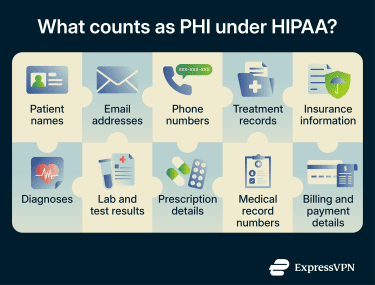
Which versions of Outlook can support HIPAA compliance?
Outlook isn't a single product; it's a family of clients and services with different licensing, features, and compliance considerations. Here's how each one stacks up:
Outlook.com
Free Outlook.com is a consumer email service and is not listed among Microsoft’s cloud services covered by Microsoft's HIPAA BAA. Outlook is better suited to HIPAA-regulated email when it’s used through a qualifying Microsoft 365 or Office 365 subscription. Healthcare staff shouldn't use free Outlook.com accounts for communications involving PHI.
Microsoft 365 Outlook
Outlook included in qualifying commercial, enterprise, education, or government Microsoft 365 and Office 365 plans can support HIPAA compliance when used with in-scope Microsoft cloud services and the right organizational safeguards. Microsoft also states that it adheres to HIPAA Security Rule requirements in its role as a business associate.
But two things are worth knowing upfront. First, not every plan ships with the same security features. Microsoft Purview Message Encryption is included in several plans, including Office 365 Enterprise E3 and E5, Microsoft 365 Enterprise E3 and E5, Microsoft 365 Business Premium, and certain education and government plans. Other plans may need an add-on or upgrade.
Second, there's no HHS-approved certification that proves HIPAA compliance. Microsoft provides the tools and the BAA for in-scope services, but compliance itself is the organization’s responsibility.
Desktop Outlook application
The Outlook desktop app for Windows and macOS doesn't have a HIPAA status of its own; compliance comes from the Microsoft 365 or Office 365 service it connects to and how that service is configured. If the subscription is covered by Microsoft’s HIPAA BAA and the organization has the right safeguards in place, the desktop client can be used as part of a HIPAA-compliant setup. Think of the app as the window, not the building.
Mobile Outlook apps
The same applies to Outlook for iOS and Android: compliance depends on the underlying Microsoft service, licensing, configuration, and safeguards, not the app alone. Mobile use can add risks that desktop use may not, especially on personal devices. Lost or stolen phones, unmanaged app access, local data storage, cloud backup settings, and weak device controls can all increase exposure if mobile email is not managed properly.
What it takes to make Outlook HIPAA compliant
Getting Outlook to a HIPAA-ready state isn't a single step; it's a combination of contractual, technical, and human safeguards that must all be in place. Here’s what each one looks like.
1. Signing a Business Associate Agreement (BAA)
A BAA is legally required when a vendor creates, receives, maintains, or transmits PHI on behalf of a covered entity or business associate. For eligible Microsoft cloud services, Microsoft’s HIPAA BAA is available through the Microsoft Online Services Data Protection Addendum (DPA) by default, rather than as a separate agreement that organizations must download and sign manually. Microsoft’s HIPAA and Health Information Technology for Economic and Clinical Health (HITECH) compliance documentation explains which cloud services are in scope.
That said, organizations should still review the current BAA and related data protection terms before using Microsoft services for PHI. Some terms may affect internal workflows, including how patient-access requests are handled and where PHI can be entered within Microsoft services. If those terms create issues for internal policy or patient-access workflows, it’s better to know before relying on the service for PHI.
2. Enabling email encryption
Encryption isn't strictly mandatory under HIPAA Rules, but it's an addressable Security Rule specification. According to the HSS use of encryption documentation, if an organization decides that encryption is not reasonable and appropriate, it must document that decision and implement an equivalent alternative measure when reasonable and appropriate. In practice, encryption is commonly used because it is the clearest way to reduce exposure when PHI is sent by email.
For Outlook in Microsoft 365, organizations can use tools such as Microsoft Purview Message Encryption or Secure/Multipurpose Internet Mail Extensions (S/MIME), depending on their licensing, client support, and security requirements. These options protect message content beyond basic delivery between mail servers.
There's also encryption at the transport layer: the protocol that protects email in transit between mail servers. Microsoft has deprecated Transport Layer Security (TLS) 1.0 and 1.1 for Microsoft 365, and Microsoft 365 connections now use at least TLS 1.2, with limited exceptions. Exchange Online uses opportunistic TLS by default, meaning it attempts to encrypt mail in transit, but messages may be sent unencrypted if the other mail server doesn’t support TLS and no policy requires encrypted delivery.
Organizations should confirm that external mail systems support currently accepted TLS versions and configure mail-flow policies appropriately, since messages may fail or not receive the expected transport protection when systems can't negotiate compatible encryption.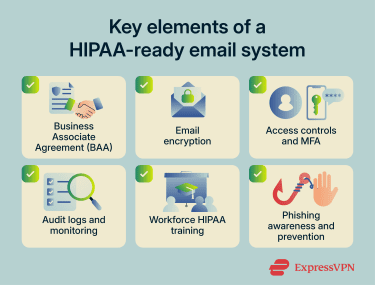
3. Configuring access controls and MFA
The Security Rule requires controls that limit ePHI access to authorized users. For email services to support HIPAA compliance, they should be configured with unique user access, appropriate session controls such as automatic logoff, and audit logs that record relevant activity.
Within Microsoft 365, these safeguards are managed across several tools. Microsoft Entra ID can enforce access controls through Conditional Access; Microsoft Purview data loss prevention (DLP) can help identify and protect sensitive information in Exchange email, and Microsoft Purview Audit can monitor user and admin activity across Microsoft services. Compliance Manager can help track related controls and improvement actions.
Multi-factor authentication (MFA) isn't explicitly named in the Security Rule, but it directly supports HIPAA's access control and authentication requirements by making account takeover harder. It should be enabled for every account that can access PHI.
4. Training employees on HIPAA and phishing risks
The HIPAA Security Rule requires security awareness training for all members of the workforce, including management. Staff should know what counts as PHI, when it can and can't be sent by email, and that personal email accounts are off-limits for any work involving PHI. Phishing awareness matters too, since a fake login page can lead to stolen credentials and expose patient data in a mailbox.
Common HIPAA compliance concerns with Outlook
Even when Outlook is properly configured, everyday workflows can still create compliance exposure if they aren’t monitored. These are the risks that come up most often in practice:
- Sending email without appropriate encryption: Email protection works in layers. TLS can protect messages in transit between mail servers, while message-level encryption protects the content after delivery or forwarding. Encryption at rest depends on the systems storing the message. Without the right controls, PHI may be exposed during delivery, storage, or forwarding, or through an account compromise.
- Insufficient ePHI access controls: The Security Rule requires that ePHI access be limited to authorized users. Access-control and safeguard failures are recurring themes in HIPAA enforcement, especially when accounts, mailboxes, or permissions are overly permissive.
- Improper email storage and retention: If PHI is stored in emails, the organization needs retention, archiving, and search processes that can support HIPAA requests and investigations. Right-of-access requests generally must be handled within 30 days, while Accounting of Disclosures requests generally must be handled within 60 days, with limited extensions available.
- Human error and misdirected emails: Sending ePHI to personal accounts, choosing the wrong recipient, or emailing more information than necessary can create HIPAA exposure. Staff training, address checks, DLP rules, and clear email-use policies help reduce these risks.
Also read: What is medical identity theft, and how can you protect yourself?
Best practices for using Outlook in healthcare
Setting things up correctly is one thing; keeping them that way is another. These practices help maintain compliance once the initial configuration is done.
Implementing a written email policy
Technical controls aren't enough on their own. A documented email policy should cover which types of PHI can be shared by email and when, the minimum-necessary standard for what goes into a message, rules for labeling and forwarding, and what to do when PHI ends up with the wrong recipient.
Monitoring and auditing email activity
Access and audit controls should be configured to limit access, apply appropriate session controls such as automatic logoff, and generate event logs. That makes it easier to investigate activity involving PHI, including who accessed, changed, deleted, or forwarded relevant messages where logs are available.
DLP alerts, audit logs, and activity reports in Microsoft Purview are worth reviewing regularly. That’s how organizations can catch unauthorized access or unusual forwarding patterns early and investigate them before they escalate.
Reviewing and updating security settings regularly
Microsoft's security landscape changes: protocols are deprecated, planned features shift, and new vulnerabilities surface. Regular HIPAA risk assessments identify vulnerabilities that affect the confidentiality, integrity, and availability of ePHI, and the findings should inform Outlook and Microsoft 365 configuration. Tying a security review to the annual risk assessment is a sensible baseline, but settings should also be reviewed when systems, policies, or risks change.
HIPAA-compliant alternatives to Outlook
Outlook isn't the only email platform that can be used in a HIPAA-compliant environment. Several email providers offer services designed to support HIPAA requirements, either as complete email solutions or as add-ons to existing email systems.
Organizations that prefer Google's ecosystem can use eligible Google Workspace plans, which follow many of the same principles as Microsoft 365: selecting a qualifying subscription, accepting the applicable BAA, and properly configuring security controls.
Other healthcare-focused email providers are available as well. Some offer built-in encryption, secure delivery controls, archiving, and administrative tools designed for HIPAA-regulated workflows. Regardless of the provider, organizations should verify the current BAA terms, service scope, included security and compliance features, configuration requirements, and whether the solution aligns with the risks identified during the HIPAA risk assessment.
Also read: Is WhatsApp HIPAA compliant?
FAQ: Common questions about Outlook HIPAA compliance
Is Microsoft Outlook automatically HIPAA compliant?
Does Microsoft 365 include HIPAA compliance?
How do I encrypt emails in Outlook?
Do I need a BAA with Microsoft?
Can Outlook mobile apps be HIPAA compliant?
What happens if Outlook is used in a way that violates HIPAA?
What is the safest email platform for healthcare providers?
Take the first step to protect yourself online. Try ExpressVPN risk-free.
Get ExpressVPN